Online check-in is available 48 to 24 hours before departure — check out these 5 key tips
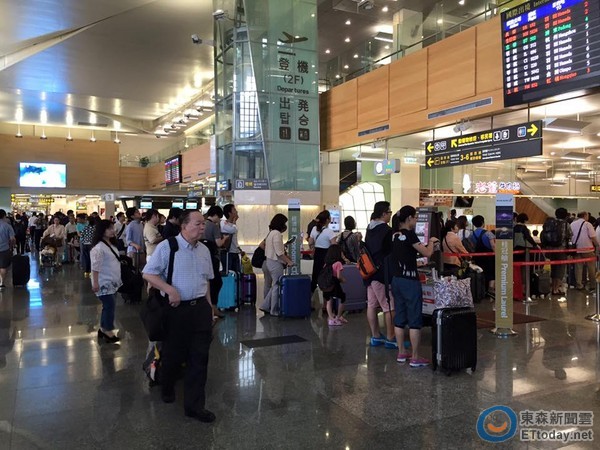
▲ Flying abroad for travel is one of the choices many people make during holidays. (Photo / Reporter Hong Shengyi, file photo)
Travel Center / Comprehensive Report
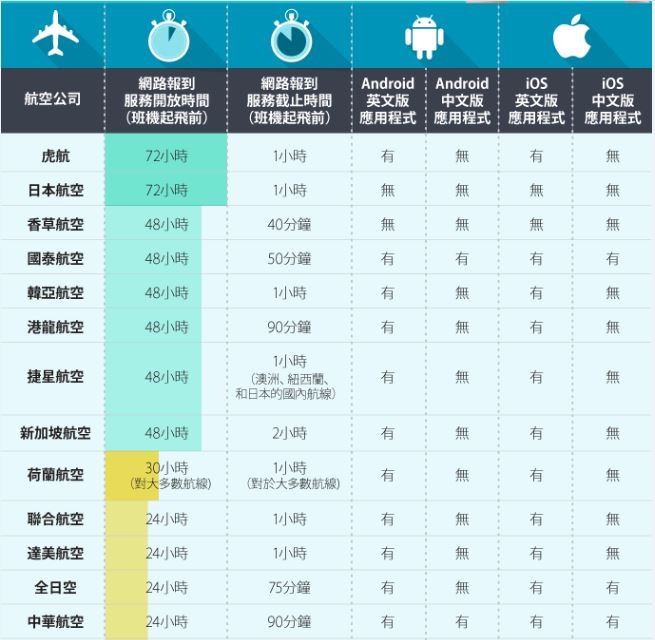
Many travelers are used to printing their boarding passes at home or saving them on their phones before a trip, but the times when airlines open online check-in vary, which can be hard to keep track of. With the peak travel season approaching at the end of the year, a well-known travel search engineSkyscannerhas compiled information on online check-in services from major airlines and shared some handy tips for using them, helping travelers prepare smoothly for their journeys.
The released data shows that most airlines open online check-in about 48 to 24 hours before departure, with check-in closing mostly between 3 and 1 hour before the flight.If you don’t want to arrive at the airport too early, it’s recommended to use online check-in or your airline’s mobile app to avoid queuing. However, most low-cost carriers do not yet offer online or app-based check-in services, so passengers are advised to arrive at the airport earlier to avoid missing the check-in window.
In addition, regardless of the airline, you can refer to Skyscanner’s tips for online check-in and boarding to speed up the whole process.
[Online Check-in & Boarding Tips]
1. Know in advance when online check-in opens
Know when online check-in is available for your flight, especially if you’re abroad — make sure to download the app or complete online check-in when you have internet access.
2. Print your boarding pass early
Download or print your boarding pass before departure to speed up the check-in process. You can also save your boarding pass to your phone via Passbook (iOS) or PassWallet (Android).
3. Make good use of the airline’s app, and minimize using your mobile device to access the airline’s website
Download the airline’s app in advance — apps usually use less data and are more user-friendly than websites.
4. International data roaming may be cheaper than you think
Thanks to advanced mobile networks, you can now use your phone for navigation or search for travel info while abroad. By applying for a roaming data plan from your carrier, buying a local SIM card, or renting a mobile hotspot, you can use your phone freely without worrying about a huge bill.
5. Use free Wi-Fi hotspots
If your accommodation doesn’t offer free Wi-Fi, look for chain stores nearby — places like McDonald’s, Starbucks, or Apple Stores often provide free Wi-Fi, sometimes even outside their shops.
Major AirlinesOnlineCheck-in Service Information. (Photo / Provided by Skyscanner)
%嫉阄铱创笸技/a>

Share
This article is published by HowToTrip. Sharing and reposting are welcome — please credit the source.
Article URL: https://www.howtotrip.net/views-9568
Related Articles
- Shaoxing's "Grandpa Gourd" hangs the gourds back up: "If there are too many people, we'll interact less — just take a quick look from afar"
- Chinese authorities announce "reciprocal adjustment" to Japan visa fees — single-entry visa jumps from 2,250 to 16,750 yen!
- 旅客携带的“保健石”核辐射超标千倍,同机人员或遭殃!海关提醒!
- 深圳机场深夜通报!出现不明升空物,航班大面积延误!
- “拆盒洗了才说要钱!”高铁200克葡萄卖60元,12306回应!
- 买不了机票?出境被拒?登机被拦?一大波中国游客莫名成了“失信人”
- 不利天气和经济波动影响哥伦比亚咖啡市场
- 海边浴场回应冲脚淡水收费2元/30秒:明码标价!
- 舱门没关好就起飞?机翼出现问题?多个航班途中紧急折返!
- 感受大自然的馈赠!盘点世界十大唯美海岸线